
Navigating Valorant's Refund System: A Comprehensive Guide for 2025
Valorant refund policy and skin refund guide empower players to reclaim spent VP or reverse skin purchases with clarity and ease.
Valorant, the tactical first-person shooter, has solidified its place as a global phenomenon by 2025, captivating a player base of millions with its sharp competitive gameplay and an ever-expanding arsenal of visually stunning weapon cosmetics. The allure of these skins, often as intricate as a master jeweler's finest work or as sleek as a concept car from the future, can sometimes lead to impulse purchases. In the heat of the moment, a player might acquire a skin bundle only to later question its value. Unlike a simple retail return, navigating Valorant's refund policy requires specific knowledge and adherence to strict guidelines. This guide serves as a detailed map through the often-misunderstood terrain of recovering spent Valorant Points (VP) or reversing skin purchases.
The first and most crucial step is identifying the type of refund you seek. The process diverges significantly depending on whether you want to refund unused Valorant Points or a specific in-game item like a weapon skin.
Refunding Unused Valorant Points (VP)
If your purchase regret stems from buying VP you haven't spent, you have a narrow but clear window for recourse. You must submit a formal request through Riot Games' official support page. The success of this request hinges on several non-negotiable conditions, acting as a digital lock that must be picked precisely:
-
🤖 Account Authentication: You must be logged into the exact Riot account used for the VP purchase.
-
⏰ 14-Day Time Limit: The support ticket must be raised within 14 days of the transaction.
-
💎 VP Purity: The purchased VP must remain completely untouched—not a single point can have been spent on skins, upgrades, Radianite, or any other in-game item.
If these criteria are met, navigate to the support page and select the "Billing, Payment, and Cash Refunds" ticket category. Filling out the provided form thoroughly and providing a compelling reason for the refund request will initiate the review process. If Riot's verification systems, as intricate as a Swiss watch's movement, find everything in order, a refund to your original payment method will be processed.
Refunding a Weapon Skin or In-Game Item
The process for refunding a skin or item you've already purchased with VP follows a different, more self-service path. Think of it as accessing a personal transaction vault with a limited-time return bin.
-
Access Support: Go to Riot Games' support page.
-
Log In: Ensure you are logged into your Valorant account. If not, scroll to the bottom of the page to sign in.
-
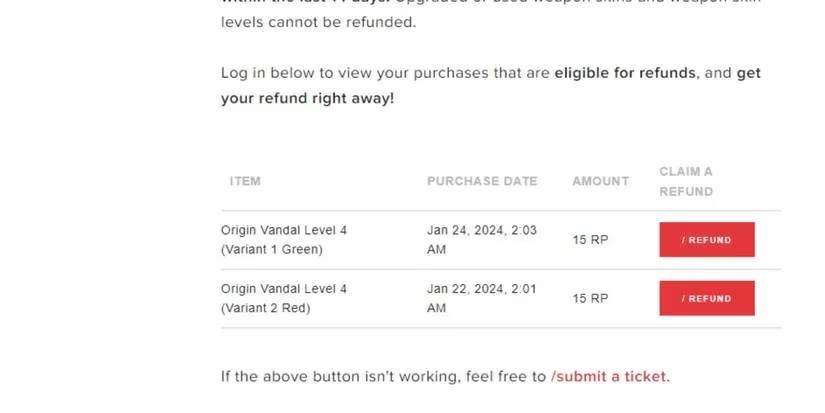
Order History: Once logged in, locate and click on the "Get my Order History" option.
-
Review Transactions: This will display a list of your recent transactions that are eligible for a refund. Eligibility is automatically determined by Riot's systems based on strict usage rules.
-
Select & Refund: Simply select the specific skin or item transaction you wish to reverse, and confirm the refund. The VP spent will be returned to your account.
The Ironclad Rules: What You Cannot Refund
Understanding what is not refundable is as important as knowing the refund process itself. Valorant's policy is designed to prevent abuse and is as unyielding as a vault door once certain actions are taken. The golden rule is: any form of usage typically invalidates a refund. Below is a comprehensive table of items and scenarios that are ineligible for a refund in 2025:
| Ineligible Item/Category | Reason for Ineligibility |
|---|---|
| Used Weapon Skins | The skin was equipped in any game mode (Unrated, Competitive, Swiftplay, etc.). |
| Upgraded Weapon Skins | Any Radianite Points were spent to unlock visual or audio effects, variants, or finishers. |
| Weapon Skin Levels & Variants | Individual levels or color variants purchased separately from a base skin cannot be refunded. |
| Weapon Skin Bundles | Entire bundles cannot be refunded if any single item from the bundle has been used. |
| Used Accessories | Gun Buddies, Player Cards, Sprays, or Titles that have been equipped are final. |
| Agents | Once an Agent is unlocked (with VP or through contract progression), the purchase is permanent. |
| Premium Battle Passes | Activating a Battle Pass, even if you haven't progressed it, makes it non-refundable. |
| Premium Battle Pass Levels | Individual tier skips purchased with VP are immediately consumed and non-refundable. |
| Radianite Points | VP converted into Radianite Points, or Radianite Points themselves, cannot be refunded. |
| Kingdom Credits Purchases | Any item bought from the Agent Gear or Accessories store using Kingdom Credits is final. |
Pro-Tips for the Discerning Player
To avoid the need for a refund, consider these strategies:
-
Utilize the Preview Range: Before any purchase, test the skin's inspect animations, reload sounds, and shooting effects in the Range. A skin that looks good in the store might feel as awkward as a dancer with two left feet in your hands.
-
Watch In-Depth Reviews: Many content creators provide exhaustive reviews of new skin bundles, showcasing all variants, upgrades, and finishers in actual gameplay.
-
Embrace the Night Market: The periodic Night Market offers personalized discounts on older skins, allowing you to acquire coveted items at a reduced VP cost, making buyer's remorse less likely.
-
Consider the "Feel": A skin's statistical value is zero; its worth is purely subjective. A sleek, minimalist skin might improve your focus more than a flashy, distracting one that glitters like a disco ball in a library.
By 2025, Riot Games has refined this system to be clear and functional for genuine cases while protecting the game's economy. Always remember that the most powerful tool against purchase regret is informed decision-making. Check your eligibility swiftly, understand the immutable boundaries of the policy, and let this guide be your compass in the vibrant, sometimes overwhelming, marketplace of Valorant.